


Every organization eventually faces the critical question: should we modernize our existing ERP system or replace it entirely? This isn’t merely a technical decision—it’s a strategic business question that can impact operations, budgets, and competitive positioning for years to come.
Having architected and deployed 13 enterprise resource planning systems across diverse industries—from educational institutions and healthcare facilities to hospitality and manufacturing sectors—I’ve witnessed firsthand the consequences of both approaches. The companies that made the right call enjoyed streamlined operations and user adoption; those that didn’t faced budget overruns, resistance, and disruption.
This article provides a practical decision framework to help you navigate this crucial choice.
The Cost of Delay vs. The Cost of Change
Before evaluating replacement versus extension, understand what inaction costs. Legacy ERP systems typically become increasingly expensive to maintain—licenses proliferate, customizations layer upon customizations, and technical debt compounds annually.
Consider two real scenarios from my consulting experience:
Scenario 1: The Healthcare Provider (Extend): A mid-sized hospital chain running a 12-year-old ERP system faced critical reporting gaps in their pathology lab management workflow. Rather than replacing the entire system, we extended it with modern APIs and a new data analytics layer. The investment was 40% of replacement costs, and they achieved 90% of the desired functionality within four months. Today, their pathology lab management generates real-time insights that were previously impossible.
Scenario 2: The Educational Institution (Replace): A university with a 15-year-old school management system faced not just technical limitations but fundamental architectural incompatibility with modern learning management platforms. Extending would have created years of workarounds. Replacement took 14 months but enabled student registration, attendance tracking, and reporting systems that couldn’t have been bolt-on solutions. The ROI became apparent in year two through automated processes.
Key Decision Factors: A Diagnostic Checklist
1. Current System Architecture & Age
The first indicator isn’t simply “how old is it?” but rather “how adaptable is it?”
- Legacy monolithic systems (10+ years old, tightly coupled modules): Harder to extend safely
- Service-oriented or modular systems (regardless of age): Better candidates for targeted modernization
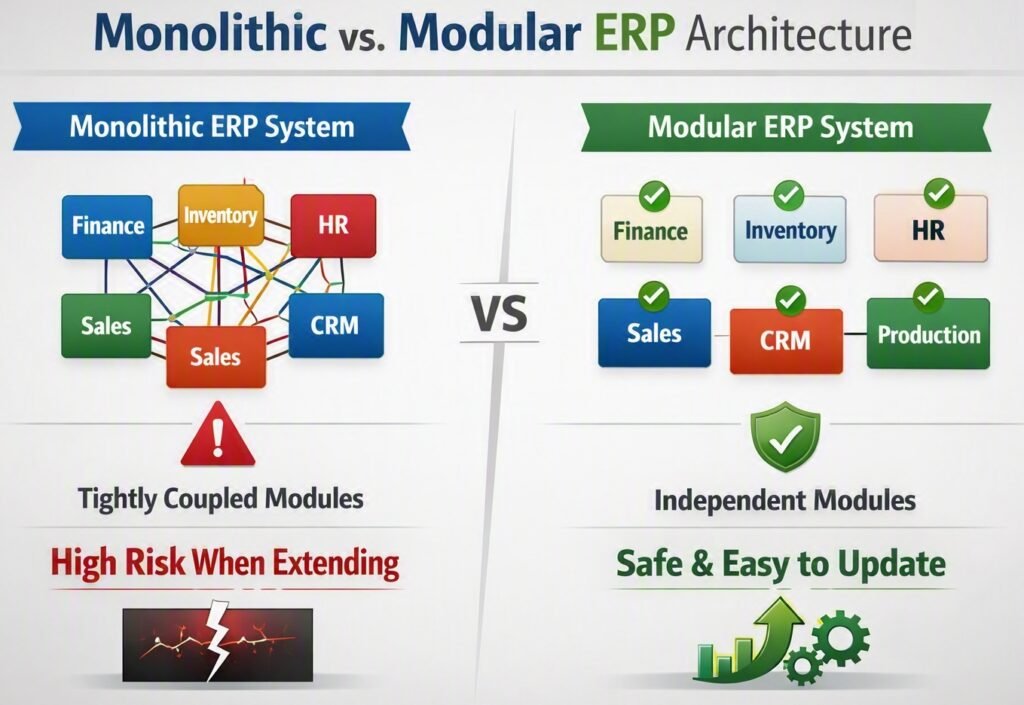
The difference matters enormously. A school management system with tightly coupled academic, financial, and HR modules presents cascading risk when you try to upgrade even one component. A system designed around microservices or clear module boundaries—even if older—can often be extended safely.
2. Business Process Alignment
Does your current system support 70% or more of your required processes “out of the box”?
- High alignment (70%+): Extension is viable
- Low alignment (below 50%): Replacement likely necessary
When we modernized a hotel and banquet management ERP for a hospitality group, the existing system had already been customized extensively for event coordination, vendor management, and multi-property operations. Rather than replace, we extended it with a modern customer portal and integrated payment processing—a fraction of replacement cost. The business processes were already aligned; they just needed modern interfaces.
Contrast this with an HR & Payroll system that tried to force manufacturing workflows into retail operations. The business had fundamentally changed, but the ERP had not. Replacement was the only viable path.
3. Data Quality & Migration Readiness
Data is your largest hidden cost in any modernization project.
Extension scenarios assume you’re keeping most data. Audit data quality now:
- Are master records clean?
- Is historical data accessible?
- Can you identify data ownership?
Replacement scenarios require complete data cleansing regardless. Plan for 20-30% of your total project budget to go toward data preparation, validation, and migration.
4. Integration Requirements
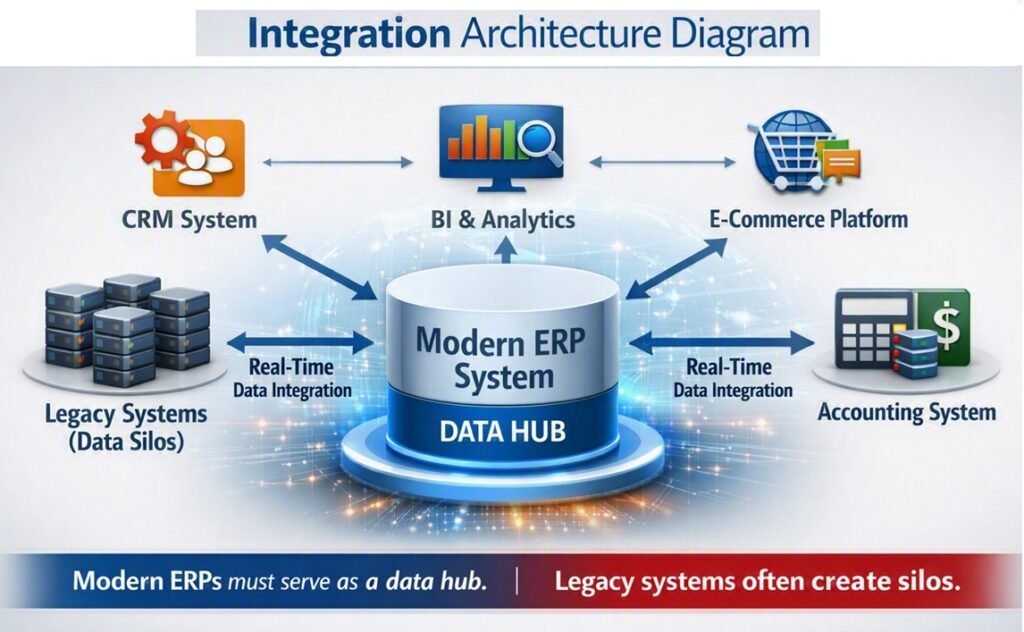
Modern businesses rarely run ERPs in isolation. Consider:
- Current integrations: How many systems must connect to your ERP?
- Future integrations: What new systems will you add in the next 3-5 years?
In my experience with web development platforms (I led development for a luxury jewelry manufacturer), the ability to integrate with e-commerce platforms, CRM systems, and analytics tools was critical. An older ERP with limited API capabilities created integration bottlenecks that eventually forced replacement.
5. User Experience & Adoption
This factor is often underestimated. Modern workforces expect:
- Mobile accessibility
- Intuitive interfaces (consumer-grade UX)
- Real-time data access
- Seamless workflow integrations
A 15-year-old ERP might be functionally adequate but feel unusable to new employees accustomed to modern SaaS applications. User frustration leads to workarounds, which lead to data integrity issues, which justifies expensive customizations—a negative cycle that often ends in forced replacement anyway.
6. Technical Debt Assessment
Conduct an honest audit:
- How much of your IT budget goes to maintenance vs. innovation?
- How many custom code patches exist?
- How many workarounds are documented (or, worse, undocumented)?
- Can your current vendor still support the version you’re running?
When technical debt exceeds 40% of total IT spend on that system, replacement usually becomes cost-effective within 3-4 years.
The Extension Path: When It Makes Sense
Extend your ERP when:
- ✓ Core processes are well-supported and stable
- ✓ The system has modern architecture (or can be refactored)
- ✓ Your data quality is reasonably good
- ✓ Integration requirements can be met through APIs
- ✓ Your budget is constrained but timeline is flexible
Real case study: One company ran three separate dashboard systems (Excel, Tableau, Power BI, and a homegrown reporting tool) on top of their ERP because the native reporting was inadequate. Rather than replace the entire ERP, we extended it by implementing a modern data warehouse and business intelligence layer. Today, they have one integrated reporting ecosystem built from their existing data, modernized interfaces, and 60% reduction in reporting latency.
Extension Project Timeline
- Data assessment: 4-6 weeks
- Architecture design: 6-8 weeks
- Development & testing: 12-16 weeks
- Rollout: 4-6 weeks
- Total: 6-9 months (vs. 12-18 months for replacement)
The Replacement Path: When It’s Necessary
Replace your ERP when:
- ✓ Core processes require fundamental redesign
- ✓ The system architecture prevents safe extension
- ✓ Vendor support is ending or cost is prohibitive
- ✓ Business model has shifted significantly (e.g., moving to cloud, multi-tenant architecture)
- ✓ You need to eliminate technical debt entirely
The educational institution I mentioned earlier required replacement because:
- Their 15-year-old system couldn’t produce real-time analytics
- Batch reporting that took 6 hours was unacceptable to modern administrators
- Mobile access was impossible with the legacy architecture
- Integration with their new online learning platform couldn’t work
The Risk Calculus
Every decision carries risk. Understand yours:
Extension Risks:
- You preserve technical debt
- You may hit capability limits mid-project
- User adoption might suffer if interfaces remain dated
Replacement Risks:
- Massive upfront investment
- Longer timeline to value
- Organization disruption during transition
- Data loss if migration isn’t managed properly
A Practical Decision Framework
Use this scoring system:
For each factor, score 1-5 (5 being “favors replacement”):
- System age and architecture
- Business process alignment
- Data quality
- Integration complexity
- User experience requirements
- Technical debt burden
- Budget constraints
- Timeline flexibility
Scoring:
- Score 10-19: Strong case for extension
- Score 20-30: Hybrid approach (extend with modernization)
- Score 31+: Strong case for replacement
This isn’t a magic formula, but it provides structured thinking that’s better than “the system is old, replace it” or “we’ve invested too much to change it.”
Implementation: A Modern Approach
Whether you extend or replace, adopt an iterative approach:
- Phase 1: Core operations (finance, operations, HR)
- Phase 2: Reporting and analytics layers
- Phase 3: Advanced capabilities (AI-driven forecasting, IoT integration)
This allows you to realize value quickly rather than waiting for a “big bang” deployment.
Conclusion
Legacy ERP modernization isn’t binary. The best decision depends on your specific situation—your current system’s architecture, your business needs, your budget, and your timeline.
I’ve seen organizations successfully extend systems that should have been replaced, and others that wasted resources replacing systems that could have been modernized. The difference wasn’t luck—it was a rigorous decision-making process.
Use this framework to ask the right questions. The answers will guide you to the right choice.
Key Takeaways:
- Extension and replacement are both valid; the decision depends on your situation
- Technical architecture matters more than system age
- Data quality and integration requirements are often underestimated
- User experience is a real business factor, not just “nice to have”
- Implement iteratively regardless of your path
